
1 ITEMVIEW CART

Total: 30.00

Expert Support
Full Speed
100% Working
10 USD
Contents:
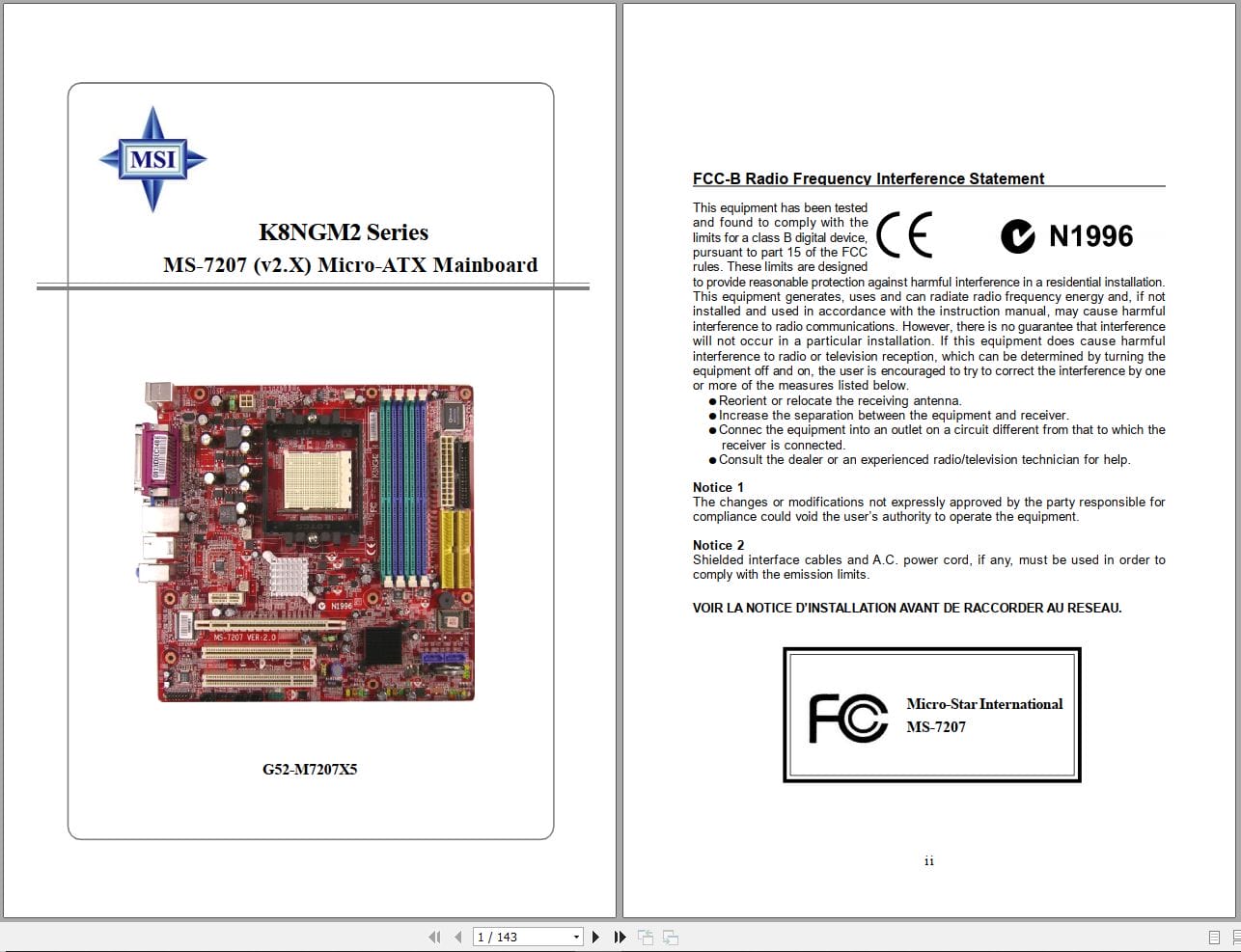
FCC-B Radio Frequency Interference Statement
Copyright Notice
Technical Support
Safety Instructions
WEEE Statement
Chapter 1 Getting Started
Mainboard Specifications
Mainboard Layout
Packing Checklist
Chapter 2 Hardware Setup
Quick Components Guide
Central Processing Unit: CPU
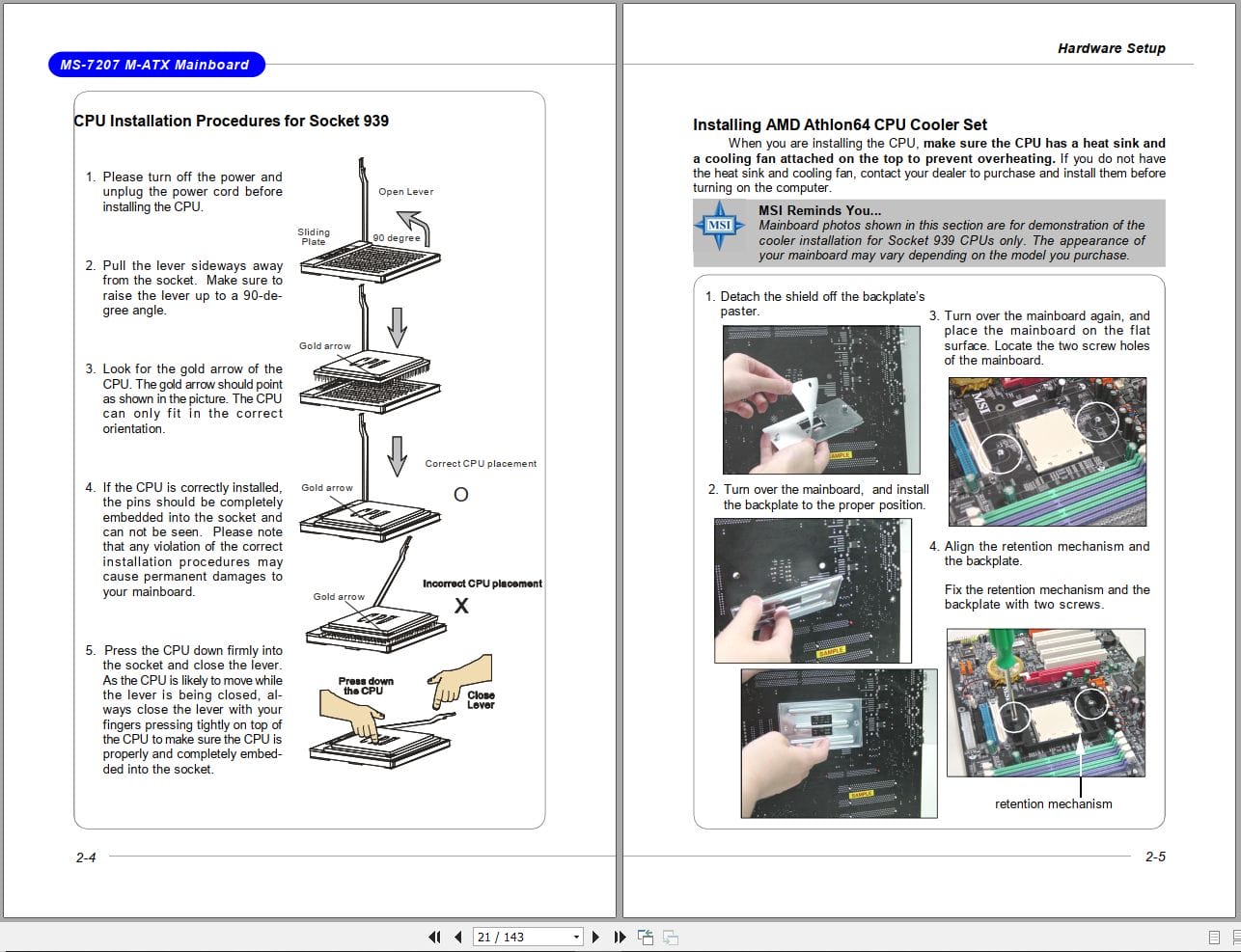
CPU Installation Procedures for Socket 939
Installing AMD Athlon64 CPU Cooler Set
Memory
DIMM Module Combination
Installing DDR Modules
Power Supply
ATX 24-Pin Power Connector: ATX1
ATX 12V Power Connector: JPW1
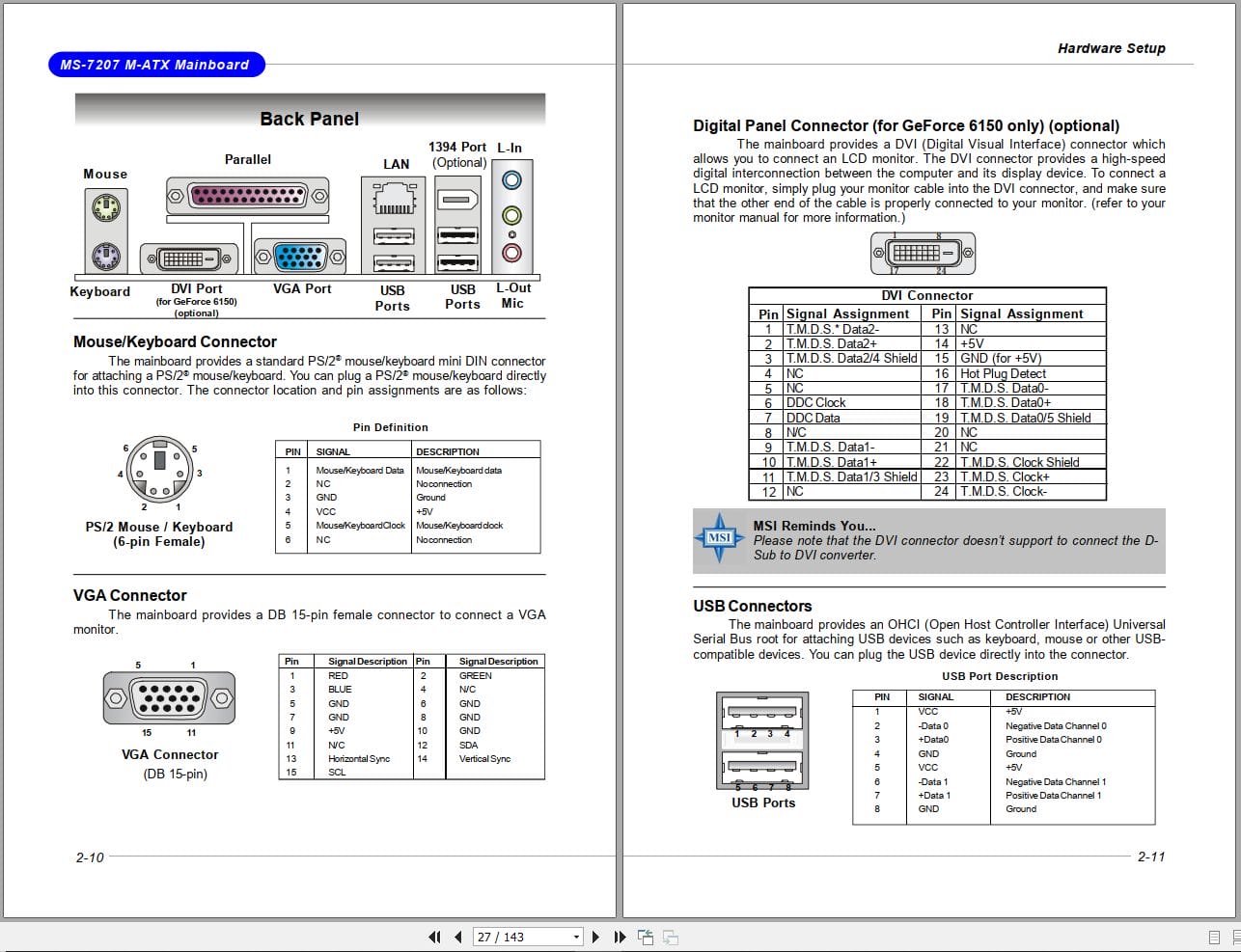
Back Panel
Mouse/Keyboard Connector
VGA Connector for GeForce 6150 only
Digital Panel Connector for GeForce 6150 only optional
USB Connectors
LAN RJ-45 Jack:10/100 LAN RTL8201CL or Giga-bit LAN VSC8201RX : optional
Audio Port Connectors & Audio Header J1
IEEE 1394 Port optional
Parallel Port Connector: LPT1
Connectors
Floppy Disk Drive Connector: FDD1
Fan Power Connectors: CPUFAN1 / SYSFAN1 / NBFAN1
ATA133 Hard Disk Connectors: IDE1 & IDE2
Serial ATAII Connectors: SATA1~SATA4
CD-In Connector: JCD1
Front Panel Audio Connector: JAUD1
Chassis Intrusion Switch Connector: JCI1
SPDIF-Out/ SPDIF-In Connector: JSPDO1/JSPDI1 SPDIF-In is optional
Audio-out Connector: J1
Serial Port Header: JCOM1 Optional
IEEE 1394 Connectors: J1394_1 Optional
Front Panel Connector: JFP1/JFP2
IrDA Infrared Module Header: JIR1
TV-Out Connector: JTV1 For GeForce 6150 Only, Optional
Front USB Connectors: JUSB1/ JUSB2
Button
Clear CMOS Button: SW1
Slots
PCI Express Slots
PCI Peripheral Component Interconnect Slots
PCI Interrupt Request Routing
Chapter 3 BIOS Setup
Entering Setup
Control Keys
Getting Help
The Main Menu
Standard CMOS Features
Advanced BIOS Features
Advanced Chipset Features
Integrated Peripherals
Power Management Features
PNP/PCI Configurations
H/W Monitor
Cell_Menu
Load Fail-Safe/ Optimized Defaults
BIOS Setting Password
Chapter 4 Introduction to DigiCell
Main
Introduction:
H/W Diagnostic
Communication
Software Access Point
Terminology
Access Point Mode
WLAN Card Mode
Live Update
MEGASTICK
Basic Function
Non-Unicode programs supported
PC Alert
Power on Agent
Power Off / Restart
Start With
Auto Login
Chapter 5 nVidia RAID Introduction
Introduction
System Requirement
RAID Arrays
Summary of RAID Configurations
RAID Configuration
Basic Configuration Instructions
Setting Up the NVRAID BIOS
Installing the RAID Driver for bootable RAID Array
NVIDIA RAID Utility Installation
Installing the NVIDIA RAID Software under Windows for Non-bootable RAID Array
Initializing and Using the Disk Array
RAID Drives Management
Viewing RAID Array Configurations
Setting Up a Spare RAID Disk
Morphing From One RAID Array to Another
Hot Plug Array
Initializing a RAID Array
Rebuilding a RAID Array
Synchronizing a RAID Array
Usind Disk Alert
Appendix A: Introduction to Realtek ALC880
Installing the Audio Driver
Installation for Windows 2000/XP
Software Configuration
Sound Effect
Mixer
AudioIO
S/PDIF
Microphone
3D Audio Demo
Information
Using 2-, 4-, 6- & 8- Channel Audio Function
Appendix B: Using the TV-Out Function HDTV-Out Integrated
Installing the TV-Out Bracket
Connecting S-Video/ RCA & HDTV Cables
Display Setup
REALEASE :
REALEASE :
REALEASE :
REALEASE :
REALEASE :
REALEASE :
REALEASE :
REALEASE :
REALEASE :
REALEASE :

REALEASE :
REALEASE :
REALEASE :
26.06.2019
REALEASE :
26.06.2019

REALEASE :
25.05.2019
REALEASE :
25.05.2019
Automotive - Heavy Equipment - Truck & Bus - Forklift - Crane